How Accurate Are Your Reaction Time Test Results?
March 10, 2026 | By Marcus Adler
You have probably spent time clicking a colored box to see how fast you are. You might get a result like 215 milliseconds and feel proud. Or maybe you got 350 milliseconds and felt a bit slow. But a big question often stays in the back of your mind: How accurate is this online test really?
Online tests are convenient, but many people wonder if their computer hardware or internet speed is changing the numbers. When professional athletes and scientists measure reaction speed, they use equipment worth thousands of dollars. Can a website on your phone or laptop really compete with that?
Dive into the science and technology behind reaction time testing. Discover how your brain processes visual cues and learn which technical factors might be masking your true reflex speed. By the end, you will know exactly how to interpret your scores and how to start your test with the best possible setup.

Understanding the Science of Reaction Time Measurement
Before we look at the software, we must understand what your body is doing. A reaction time test does not just measure your finger speed. It measures the total time it takes for information to travel through your entire nervous system. This biological "lag" is the foundation of every score you receive.
The Neurological Pathway: From Signal to Response
Everything starts when your eyes see the color change on the screen. Light hits your retina, which sends an electrical signal through the optic nerve to your brain. Specifically, the signal goes to the primary visual cortex at the back of your head.
Once your brain recognizes the change, it has to decide what to do. It sends a message to the motor cortex. This part of the brain is responsible for movement. The motor cortex then sends a signal down your spinal cord and into the muscles of your hand. Finally, your finger muscles contract to click the mouse. This entire journey happens in a fraction of a second, but every step takes a few milliseconds of time.
Simple vs. Choice Reaction Time: What Our Test Measures
There are different ways to measure speed. "Simple reaction time" is when there is only one stimulus and one response. For example, you wait for a green light and click. This is exactly what our reaction time test measures. It is the purest way to see how fast your nervous system can transmit a "go" signal.
"Choice reaction time" is more complex. This involves multiple colors or symbols, and you must react differently to each one. This tests your decision-making speed rather than just your physical response. Simple reaction tests are usually much faster because the brain does not have to "think" as much before acting.
The Technology Behind Online Reaction Time Testing
Creating a tool that measures milliseconds is a technical challenge. Even though the test looks simple, there is a lot of code working in the background to ensure the numbers are as close to reality as possible.
How Our Timer Algorithm Works
Most online tests use high-resolution timers built into modern web browsers. In the past, web timers were not very precise. However, today we use functions like performance.now(). This allows the computer to measure time with microsecond precision.
The algorithm works by picking a random delay. When that delay ends, the screen changes color and the timer starts instantly. The moment the code detects your mouse click or key press, the timer stops. The difference between the start and stop time is your result. By using random delays, we prevent you from "guessing" when the color will change, which would give a false result.
The Role of Browser Technology in Testing
Your web browser, such as Chrome, Firefox, or Safari, acts as the middleman. Every time you click, the browser has to process that event. This adds a tiny amount of time known as "processing overhead."
Modern browsers are very fast at this. They are designed to handle thousands of events per second. However, if you have fifty tabs open or a slow extension running, it can slow down the browser's response. This is why we recommend using a clean browser window when you want to see your results with the highest accuracy.
Factors That Affect Test Accuracy
Even with perfect code, external factors can change your score. If you use different devices, you will likely see different results. Understanding these variables helps you understand why your scores might go up or down on different days.
Hardware Limitations: Monitors, Mice, and Input Devices
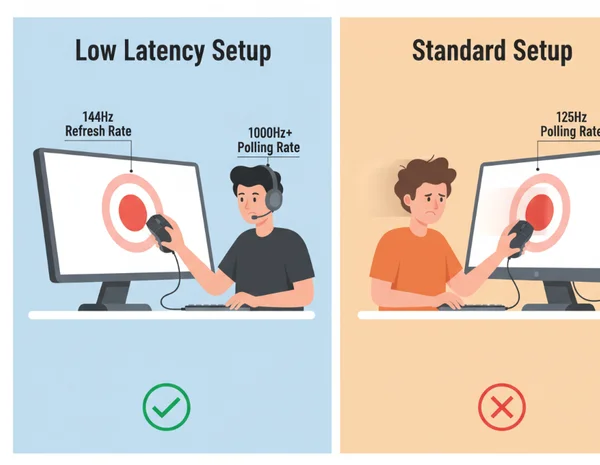
The hardware you use is the biggest source of extra "lag." Your monitor does not show the green light the exact millisecond the computer sends it. Most standard office monitors have a 60Hz refresh rate. This means the screen updates 60 times per second. This can add up to 16 milliseconds of delay just waiting for the screen to refresh.
Input devices also matter. A cheap wireless mouse might have a slow "polling rate." This is how often the mouse tells the computer where it is. If your mouse only talks to the computer every 125 milliseconds, your score will be higher than it should be. High-end gaming mice often poll at 1,000Hz, reducing this delay to just 1 millisecond.
Environmental Variables: Lighting, Focus, and Distractions
Your physical environment is just as important as your hardware. If you are in a dark room with a very bright screen, your eyes might get tired faster. Distractions, like loud noises or someone talking to you, can add 50 to 100 milliseconds to your score.
Your internal state also changes your human reaction time. Factors like how much sleep you had, your caffeine intake, and even your hydration level play a role. A person who is well-rested will always score better than someone who is tired, regardless of how fast their computer is.
Laboratory-Grade vs. Online Testing: Understanding the Limitations
It is important to be honest: no online test is 100% as accurate as a laboratory setup. However, for most people, an online test is more than enough to track performance.
What Professional Equipment Does Differently
In a scientific lab, researchers use specialized hardware. They might use light-emitting diodes (LEDs) that turn on instantly without the refresh delay of a monitor. They use mechanical buttons that send electrical signals directly to a data logger.
Some labs even use EEG caps to measure brain waves. This allows them to see exactly when the brain processed the image before the finger even moved. This "pre-motor" reaction time is the most accurate biological measurement possible.
When Online Testing Is Sufficient for Your Needs
You do not need a lab to improve your gaming skills or check your cognitive health. Online testing is excellent for "relative" measurement. This means that if you use the same computer and mouse every day, you can accurately track if you are getting faster or slower.
If you want to compare yourself to the average person, our online tool provides a great benchmark. While the absolute number might be off by 10 or 20 milliseconds due to hardware, the data is consistent enough for personal training and fun challenges.
Optimizing Your Test Environment for Maximum Accuracy
If you want the lowest possible score, you need to optimize your setup. Small changes can shave off significant milliseconds from your final result.
Minimizing Display Lag: Refresh Rate vs. Response Time
If you are a competitive gamer, you probably know about 144Hz or 240Hz monitors. These screens update much more frequently than a standard 60Hz screen. This reduces the "gap" between the computer's signal and the image appearing on your screen.
You should also look for a monitor with a low "response time." This refers to how quickly pixels can change colors. A 1ms response time monitor will show the green light much more clearly and quickly than an older television or laptop screen.
Input Device Considerations: Mouse vs. Keyboard vs. Touch
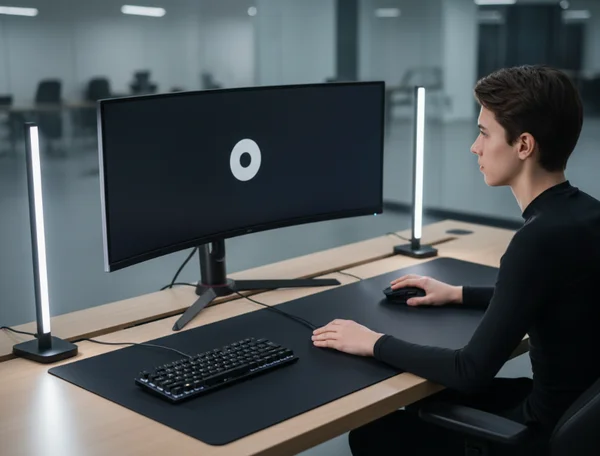
The way you click matters. Generally, a wired mouse is the fastest input device. Keyboards are also very fast, but some have "debounce" delays that can add a few milliseconds.
Avoid using a touchscreen for serious testing. Smartphones and tablets often have "touch latency." The screen has to process the electrical signal from your finger, which is much slower than a physical button click. If you want to try our free tool, a desktop computer with a wired mouse is the gold standard for accuracy.
Interpreting Your Results: What Do They Really Mean?
Once you have your number, you need to know what to do with it. Don't let one bad score discourage you.
Accounting for Measurement Error in Your Results
Always assume there is a small margin of error in any online test. Because of the hardware and browser factors we discussed, your "true" biological reaction time is likely 10 to 30 milliseconds faster than your screen shows. Instead of focusing on a single number, look at your average over five or ten tries.
When to Trust Your Numbers vs. When to Retest
If you get a score that is significantly lower than usual (like 50ms), you probably clicked too early by accident. This is an outlier. On the other hand, if your score is 500ms and you feel fine, check your hardware. You might have a slow internet connection or background apps slowing down your computer.
Consistent results are the ones you should trust. If you consistently score around 220ms, that is your reliable baseline. You can use this baseline to see how things like coffee or exercise affect your brain's speed.
Getting the Most Accurate Picture of Your Reaction Time
Master the technology behind reaction time testing to unlock more accurate results. While no online test can match a laboratory's precision, these tools provide powerful insights for tracking improvements and sharpening your reflexes. By using a fast monitor, a wired mouse, and a focused mind, you can get very close to your true biological speed.
The most important thing is consistency. Use the same environment every time you test. Are you ready to see where you stand today? Use what you have learned about optimization and start your test now to see your real potential.
FAQ Section
How much input lag should I expect from my monitor when testing reaction time?
Most standard 60Hz monitors add about 10 to 16 milliseconds of lag. High-end gaming monitors (144Hz or higher) can reduce this to less than 5 milliseconds. If you are using an older office monitor, your results might appear slightly slower than they actually are.
Can reaction time tests be affected by internet connection speed?
No, the actual timing happens on your computer's processor. Once the reaction speed test page has loaded, your internet speed does not affect the timer. However, a very unstable connection might cause the page to "stutter," which could be a distraction.
What's the minimum specification for hardware to get accurate reaction time results?
To get reliable results, we recommend a desktop or laptop computer with a wired mouse. Avoid using Bluetooth devices if possible, as wireless signals can occasionally have interference. Any modern browser like Chrome or Edge is sufficient as long as you don't have too many background tasks running.
How does online testing compare to professional reaction time assessment tools?
Online tests are usually within 20-40 milliseconds of professional tools. While labs are more precise, the convenience of a free online test makes it better for daily tracking and general self-improvement.
Can I improve my reaction time test results by practicing the test itself?
Yes, there is a "learning effect." As you get used to the test interface, your brain gets better at anticipating the visual change. However, this mostly improves your "test-taking" skill. To improve your real-world reflexes, you should combine testing with physical exercise and healthy sleep habits.